In the digital marketing industry, every single click is important, and the art of pay-per-click (PPC) advertising can be a game-changer for your business. Google Ads provides a treasure trove of tools that can help you maximize the efficiency and effectiveness of your campaigns. Among the tools provided are sitelinks, callouts, and lead forms, which can help you improve the effectiveness of your pay-per-click advertising. This guide will help you understand ad extensions and how to unlock the potential of your Google Ads campaigns.
Key Takeaways
- Sitelinks, callouts, and lead forms can significantly enhance your PPC campaign’s performance
- Using these Google Ads extensions effectively can improve your ad visibility and click-through rates
- Google automatically optimizes the display of ad extensions based on their performance
- Extensions help make your ads more relevant and engaging to potential customers
- Understanding and implementing these tools can give you a competitive edge in search engine results
Understanding the Basics of Google Ads Extensions
Google Ads extensions are the secret sauce that can transform your bland PPC campaigns into appealing, engaging experiences. But what are Assets formally known as, extensions in Google Ads? They are tools that enhance your ads by providing additional information and links. They make your ads more relevant and appealing, ultimately improving click-through rates (CTR) and overall ad performance.
When you incorporate extensions into your advertising strategy, you increase your ad visibility. Imagine your ad popping up on the search engine results page, not just as a simple text ad but as a dynamic and informative piece that draws users in. Extensions in Google Ads allow you to add layers of information, making your ads stand out from the competition.
Advertisers can use these extensions to highlight various aspects of their business, thereby improving the user experience. The extensions that resonate most with users are the ones that get showcased more often.
Understanding and utilizing ad extensions can truly set your campaigns apart. Whether it’s adding a location to your ad to guide local customers or enhancing your ads with additional links through sitelinks, these extensions are key players in the world of online advertising.
Exploring Different Types of Google Ads Extensions
Google Ads offers a plethora of extensions designed to address specific aspects of your advertising needs. Here is a list of extensions that Google Ads offers:
- Sitelink assets allow you to add extra links to specific pages on your website.
- Callout Assets are your chance to shout about additional features or offers. Callouts let you highlight enticing details in your ads, making them more attractive to potential customers.
- Lead form assets are a game-changer, capturing potential customer information directly from your ad. This is especially useful for businesses looking to generate qualified leads without redirecting users away from the search engine results page. By collecting contact information right from the ad, you simplify the user’s journey and increase the likelihood of conversion.
- Location assets provide your business’s physical address, which is a boon for local customers looking to find you.
- Call assets display your phone number right in the ad, encouraging direct contact from mobile users.
By using multiple extensions, you’re covering all bases, making it easier for potential customers to engage with your business in the way that suits them best. In a nutshell, these Google Ads extensions or assets are designed to enhance your advertising options, allowing you to provide more comprehensive information to your audience. By leveraging these tools, you can significantly improve your ad’s performance and effectiveness.

Example of ad extensions in an ad.
Step-by-Step Guide to Implementing Sitelinks in Your Campaigns
Sitelink extensions (now often called “sitelink assets”) are additional links in Google Ads that direct users to specific pages on your website, such as “Contact Us,” “Pricing,” or product categories. They appear below the main ad, increasing ad space and click-through rates. Here’s a simple step-by-step approach to adding sitelinks that enhance your ads and improve campaign performance.
1. Start by logging in to your Google Ads account and selecting the correct campaign account if you manage more than one.
2. In the left-hand menu, look for and click Assets. This is where you manage additional ad features, such as call buttons, sitelinks, and lead forms.
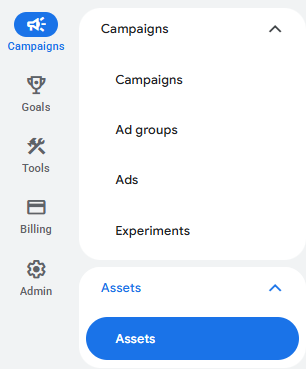
3. Once you’re in the Assets section, click the plus (+) button to add a new asset to your account.
4. From the list of available asset types, choose Sitelink. This will open the setup screen, where you can create a form that allows potential customers to submit their contact information directly from your ad.

5. In the sitelink setup screen, add a short link text (this is what users will see in your ad). Then, paste the destination URL (this should take users to a relevant page on your website, such as a service page, contact page, or special offer).

6. Double-check that your sitelinks are closely related to your ad message. For example, if your ad promotes roofing services, your sitelinks could lead to pages like “Roof Repair,” “Free Estimate,” or “Our Projects.”
7. Before saving, take a moment to review your entries. Check for spelling errors, broken links, or mismatched pages to ensure a smooth user experience.
8. Once everything looks correct, click the Save button to add your sitelinks to your campaign.
Think of sitelinks as a compass guiding users to the most valuable parts of your website. Whether it’s a special discount page or a popular product, your sitelink text should be compelling, and your URL should be accurate.
By implementing sitelinks effectively, you’re not only enhancing ad visibility on the search engine results page but also offering more pathways for potential customers to engage with your business. It’s about making every click count!
How to Set Up Lead Forms to Maximize Conversions
Ready to capture leads like never before? Let’s delve into setting up lead forms in your Google Ads account. Here are a few steps to create lead form assets in Google Ads.
1. Start by logging in to your Google Ads account and selecting the correct campaign account if you manage more than one.
2. In the left-hand menu, look for and click Assets. This is where you manage additional ad features, such as call buttons, sitelinks, and lead forms.
3. Once you’re in the Assets section, click the plus (+) button to add a new asset to your account.
4. From the list of available asset types, choose Lead Form. This will open the setup screen, where you can create a form that allows potential customers to submit their contact information directly from your ad.
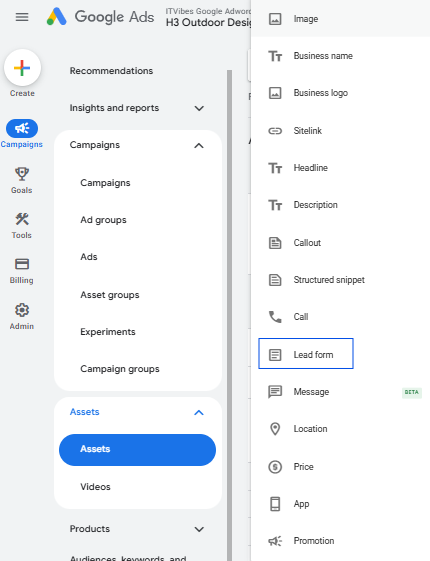
5. Add a headline and a call-to-action(CTA) that encourages users to submit their details. Customize your lead form by selecting the information you wish to collect (name, email, or phone number).
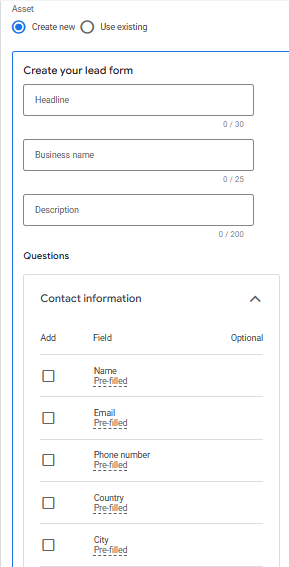
6. Add the URL to your website’s privacy policy, which is required to collect user information.
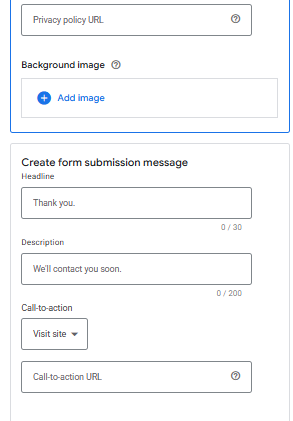
7. Create a final screen that users see after submitting the form. Include a headline, description, and an optional call to action (e.g., “Visit website”) with a corresponding URL.
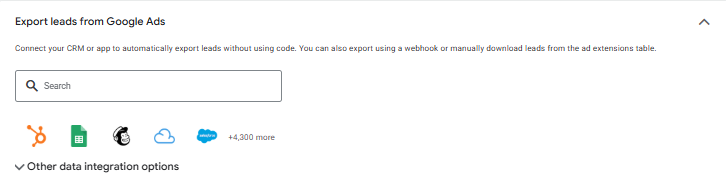
8. To receive leads automatically, you can link your Customer Relationship Management (CRM) system using a webhook or integration platforms like Zapier. Otherwise, you will need to manually download leads as a CSV file (leads are only stored for 30 days).
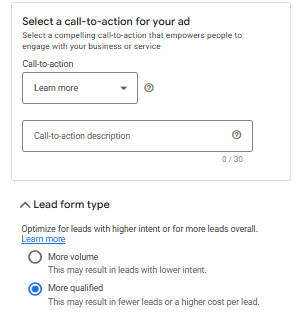
9. Choose between “More volume” (quicker form completion) or “More qualified” (adds more steps to better qualify leads).
10. Before you set your lead form live, test it to make sure everything functions seamlessly.
11. Once done, hit the save button to make them live.
Choose the details that are most valuable for your business. The less complicated the form, the higher the chances of users completing it. Design an engaging headline and call-to-action that encourages users to submit their details. Your headline should be intriguing, while your call-to-action should be persuasive.
Ensure that the form captures leads efficiently and that the user experience is smooth. This step is crucial in maximizing conversions and minimizing any friction in the lead collection process. Ensure your lead form assets are set up in compliance with Google’s policies to avoid any disapprovals. Here’s a quick checklist of Google’s policies for Lead Form assets.
With your lead forms set up, you’re ready to capture qualified leads directly from your ads. This is a powerful way to convert clicks into actual sales opportunities, and by leveraging lead form extensions, you’re positioning your business for growth and success.
Common Mistakes to Avoid When Using Google Ads Extensions
As you embark on your journey of mastering Google Ads extensions, it’s crucial to sidestep common pitfalls that can undermine your efforts. One frequent mistake is neglecting to update extensions regularly. Fresh content is key to keeping your ads engaging and relevant.
Another misstep is overloading ads with too many extensions. While it might be tempting to throw every option at your audience, too much information can overwhelm potential customers. Keep your ads concise and focused, highlighting only the most critical details that will captivate your audience.
Inconsistent messaging between your ad and its extensions can also confuse viewers. Ensure that your ad copy and extensions work together, each element complementing the other.
A common oversight is failing to track the performance of your extensions. Monitor which extensions are driving results and which aren’t, and adjust your strategy accordingly.
Finally, don’t ignore mobile optimization for extensions. With the ever-increasing use of mobile devices, ensuring that your extensions are mobile-friendly is a must. A poor mobile experience can turn potential customers away faster than a bad joke at a stand-up show. By avoiding these common mistakes, you’ll be better positioned to leverage Google Ads extensions effectively, driving your ad performance and brand visibility to new heights.
Google Ad Extension Questions
How many extensions are in Google Ads?
Google Ads offers several ad extensions to enhance your campaigns. These include sitelinks, callouts, lead forms, call extensions, location extensions, price extensions, and more. The variety allows you to tailor your ads to better meet your marketing goals. Each extension serves a unique purpose, from providing additional information to directly capturing leads. By choosing the right combination, you can significantly improve the effectiveness of your PPC efforts.
What’s the best practice for using ad extensions?
To get the most out of ad extensions, ensure they are relevant and add value to your ad text. Use sitelinks to direct users to specific pages, callouts to highlight special offers, and lead forms to capture contact information directly. Test different extensions to see which ones resonate with your audience. Keep them updated and aligned with your campaign goals for optimal performance. By doing so, you enhance user experience and improve your ad’s click-through rate.
How many ad extensions should you include?
While there’s no strict limit, it’s best to include a mix of at least three to four ad extensions in your campaigns. This variety allows you to engage users with different interests or needs. For example, combining sitelinks, callouts, and lead forms can address multiple user intents, from navigating your site to capturing leads. The key is to use extensions that align with your campaign objectives and complement your ad copy for maximum impact.
Do ad extensions cost extra?
Ad extensions themselves don’t carry additional costs, but they can influence your ad’s performance and costs indirectly. When a user interacts with an extension, like clicking a site link, it counts as a click, and you pay the standard CPC. However, ad extensions can improve your ad’s quality score, potentially lowering your CPC and increasing ad visibility. In essence, while they don’t add direct costs, they can enhance your overall campaign efficiency and effectiveness.
What are Google Ads Extensions, and why should I use them?
Google Ads Extensions are additional pieces of information that expand your ads, providing extra details and opportunities for user interaction. They enhance the visibility and appeal of your ads by allowing you to include additional links, contact information, promotional texts, and more. Using them can improve your ad’s click-through rate and overall performance by making your ads more informative and engaging. They help you capture more qualified leads and better meet user intent.
Maximize PPC Performance with Sitelinks and Lead Forms Extensions
Sitelinks and lead forms are powerful tools in the Google Ads ecosystem, offering myriad opportunities to enhance your ad campaigns. By understanding the basics, exploring different types, and implementing them correctly, you can significantly improve your PPC results. Avoiding common mistakes ensures your efforts aren’t wasted, leading to more effective advertising.
As a results-driven marketing agency, we specialize in optimizing PPC campaigns with advanced ad extensions that drive higher engagement and conversions. From crafting compelling sitelinks and callouts to implementing high-performing lead forms, we help businesses maximize every click. Our data-backed strategies ensure your campaigns not only attract attention but also generate qualified leads consistently.
Ready to turn your PPC campaigns into consistent lead generators? Let our experts help you implement high-performing ad extensions. Request a free quote today!

Afreen works as a PPC Manager at ITVibes and holds a Master’s degree in Computer Science Engineering. She enjoys reading books and has a passion for creating compelling ad campaigns, bringing genuine enthusiasm to her work in digital marketing.