
With Google Ads, you have a powerful tool, but leveraging its full potential requires a strategic approach. Google Ads Recommendations Results Tab is a feature designed to provide actionable insights that can elevate your campaigns to a whole new level. Whether you’re looking to optimize bids, refine keywords, or enhance your ads, understanding how to effectively use this tool can make all the difference.
Key Takeaways
- Google Ads Recommendations offer essential insights to enhance campaign performance
- Accessing the Results Tab is straightforward and intuitive
- Implementing recommendations can significantly impact your campaign’s metrics
- The Results Tab helps prioritize changes for maximum performance gains
- Navigating the interface is user-friendly, with features designed for easy understanding
The Importance of Google Ads Recommendations for Your Campaigns
Google Ads Recommendations give you a helpful starting point for improving campaign performance. They highlight opportunities to refine your bids, update keywords, and strengthen ad quality, making it easier to reach the right audience and achieve better results. Rather than being random suggestions, these recommendations are powered by Google’s data and AI, providing insights designed to help advertisers make smarter, more informed decisions.
Recommendations can benefit businesses of all sizes, but the value they provide often depends on how they’re applied. From small business owners looking for simple optimization tips to agencies managing multiple client accounts, these insights help streamline decision-making and uncover opportunities for better performance.
- For small business owners, managing online advertising can feel overwhelming. Google Ads Recommendations make the process easier by turning complex optimization tasks into clear, actionable steps. From improving keyword targeting to refining PPC strategies, these insights help businesses make smarter decisions that support their growth goals.
- Digital marketers rely on data to stay competitive, and Google Ads Recommendations provide valuable guidance for ongoing campaign improvements. They help uncover performance trends, identify optimization opportunities, and highlight areas that may need attention. This makes it easier to adapt strategies and maintain strong campaign performance over time.
- Advertising agencies use recommendations to help clients achieve better results while managing campaigns more efficiently. These insights can reveal opportunities to increase conversions, improve ad performance, and maximize return on ad spend. When used strategically, they support stronger outcomes and help agencies deliver greater value to their clients.
How to Access the Results Tab in Google Ads
Finding the Results tab in Google Ads is simple, but knowing where to look can save time and help you uncover valuable campaign insights. This feature provides a clearer view of how recommendations have impacted performance, making it easier to evaluate optimization efforts. Understanding how to access it ensures you can make better-informed decisions for your advertising strategy.
Step 1: Sign in to your Google Ads account and go to the main dashboard, where you can view your campaigns and account performance.
Step 2: From the navigation menu on the left, click Recommendations. This section contains Google’s suggestions for improving campaign performance.
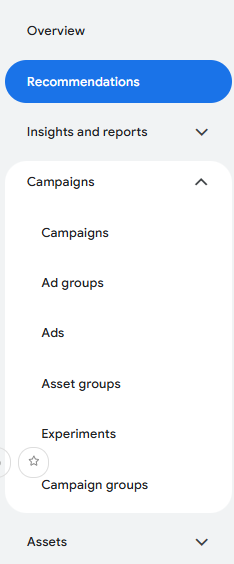
Step 3: Browse the available recommendations to familiarize yourself with the optimizations Google suggests for your account.
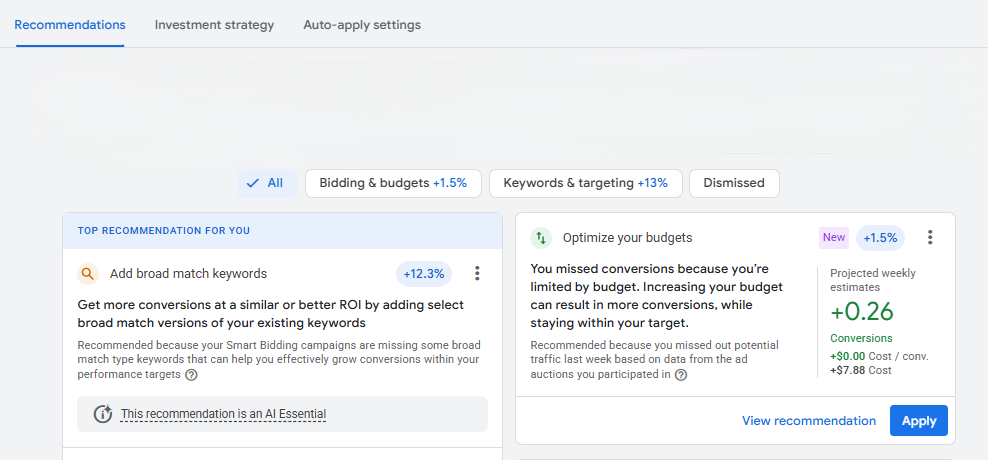
Step 4: At the top of the Recommendations page, locate the Results tab. Depending on your account interface, it may appear alongside other recommendation-related options.

Step 5: Click the Results tab to see how previously applied recommendations have affected your campaigns and overall performance.
Step 6: Review the performance metrics and insights provided. Look for changes in key indicators such as conversions, clicks, impressions, and conversion value.
Step 7: Use these insights to better understand which optimizations are driving results and to guide future decisions for your Google Ads campaigns.
Understanding the Impact of Recommendations on Performance
Applying Google Ads Recommendations can help you get more out of your campaigns without relying on guesswork. These suggestions are designed to improve key performance metrics, such as conversions, impression share, and overall ad effectiveness. Simple adjustments, like refining your keywords or updating ad content, can often lead to noticeable improvements in results.
Every successful campaign is driven by data, and recommendations can point you toward opportunities you might otherwise overlook. For example, updating a keyword or adjusting your bidding strategy could improve your Quality Score, helping your ads appear more often and in better positions. Over time, these small optimizations can have a meaningful impact on campaign performance.
That said, not every recommendation will be the right fit for your business. It’s important to review each suggestion carefully and consider how it aligns with your goals, budget, and target audience. By combining Google’s insights with your own understanding of your business, you can focus on the changes most likely to deliver value.
Using the Results Tab to Optimize Your Campaigns
The Results Tab in Google Ads is a powerful tool for campaign optimization. It offers a clear view of which changes can boost your campaign’s performance, making it easier for you to stay ahead of the competition. Each recommendation comes with an “Apply” button, allowing for quick implementation and immediate results.
- Prioritizing recommendations based on their potential impact can help you get the most value from your campaigns. The Results Tab makes it easier to identify which changes are likely to deliver the strongest performance improvements.
- Reviewing past results helps you understand how previous optimizations have influenced campaign performance. These insights can guide future decisions and help you focus on strategies that consistently produce positive outcomes.
- Regularly checking the Results Tab keeps you informed about how your campaigns are evolving over time. Staying proactive allows you to adapt to changes quickly and maintain a competitive edge in your advertising efforts.
Navigating the Google Ads Recommendations Interface
The Google Ads Recommendations interface is designed for intuitive navigation, making it user-friendly even for those new to online advertising. It is designed to help advertisers quickly identify opportunities for campaign improvement. Some key features of the Google Ads Recommendations interface include:
- Filters that allow you to sort recommendations by impact and relevance, helping you focus on what matters most to your business.

- Each recommendation includes a detailed explanation, providing you with a better understanding of the suggested action. This clarity ensures that you make informed decisions, reducing the guesswork often associated with campaign optimization.
Google Ads Recommendations Result Tab Questions
Can seasonal trends affect the results shown in the Recommendations Results Tab?
Yes, seasonal trends can have a significant impact on the performance data displayed in the Results Tab. Consumer behavior often changes throughout the year due to holidays, industry cycles, or special promotions, which can influence campaign outcomes. When reviewing recommendation results, it’s important to consider whether performance improvements were driven by the recommendation itself, seasonal demand, or a combination of both factors.
How long should I wait before evaluating the impact of a recommendation?
The amount of time needed depends on factors such as campaign traffic, budget, and conversion volume. High-traffic campaigns may generate enough data within a few days, while smaller campaigns often require several weeks before meaningful patterns emerge. Allowing sufficient time for data collection helps ensure your decisions are based on reliable insights rather than short-term fluctuations.
Can multiple recommendations applied at the same time make results harder to interpret?
Yes, implementing several recommendations simultaneously can make it challenging to determine which change contributed to the results. When multiple variables are adjusted at once, it becomes difficult to isolate the effect of any single optimization. Applying recommendations gradually allows for more accurate performance analysis and helps you identify the changes that deliver the greatest value.
Should businesses with limited budgets use recommendations differently?
Businesses with smaller advertising budgets should approach recommendations with a stronger focus on efficiency and return on investment. Instead of applying every suggestion, it’s often more beneficial to prioritize recommendations that improve conversion quality, audience targeting, or bidding efficiency. This selective approach helps maximize results while maintaining better control over advertising spend.
Can the Results Tab reveal opportunities for testing new strategies?
Absolutely. The insights available in the Results Tab can highlight areas where further experimentation may lead to additional gains. If certain recommendations consistently improve performance, they may indicate broader opportunities for testing new bidding approaches, audience segments, ad formats, or messaging strategies. This information can support a more proactive and data-driven optimization process.
Putting Google Ads Recommendations to Work for Your Business
The Google Ads Recommendations Results Tab is a powerful tool for optimizing your campaigns. By accessing and understanding the insights provided, you can make strategic decisions that enhance your campaign’s performance. Remember to apply recommendations based on your business goals and analyze past results for continuous improvement.
At our digital marketing agency, we help businesses turn Google Ads insights into measurable results. Rather than applying recommendations blindly, we analyze performance data, evaluate the impact of past optimizations, and develop strategies that align with your unique goals. Our data-driven approach ensures every campaign decision is focused on maximizing efficiency, conversions, and long-term growth.
Ready to get more value from your Google Ads campaigns? Contact us today for a free proposal, and we’ll help you learn how to leverage Google Ads Recommendations and performance insights to drive better results for your business.

Afreen works as a PPC Manager at ITVibes and holds a Master’s degree in Computer Science Engineering. She enjoys reading books and has a passion for creating compelling ad campaigns, bringing genuine enthusiasm to her work in digital marketing.